Why should you care about security?
Security failures are not abstract. They cost money, leak the personal records of hundreds of millions of people, and (in cyber-physical systems like cars, pacemakers, and power grids) they threaten lives. Before we study any single attack, it helps to see the shape and scale of the problem.
There is a real economy behind attacks
Attacks are not just the work of lone hobbyists. Behind them sits a mature underground economy: an organized market that sells stolen data, exploit kits, malware installs and money laundering, turning hacking into a profit-driven business. It has specialists. A pay-per-install service, for example, will for a fee install your malware on thousands of machines it has already compromised, so an attacker who cannot break into anything can simply buy the victims. Researchers have tried to measure what all of this costs society.
Roughly {{ costRatio }} more is spent defending against cybercrime than criminals actually take.
Those defensive costs are paid whether or not an attack ever lands, and they include the trust an incident destroys. That asymmetry is a recurring theme in the course: a big part of thinking clearly about security is asking who pays, and how much, on each side.
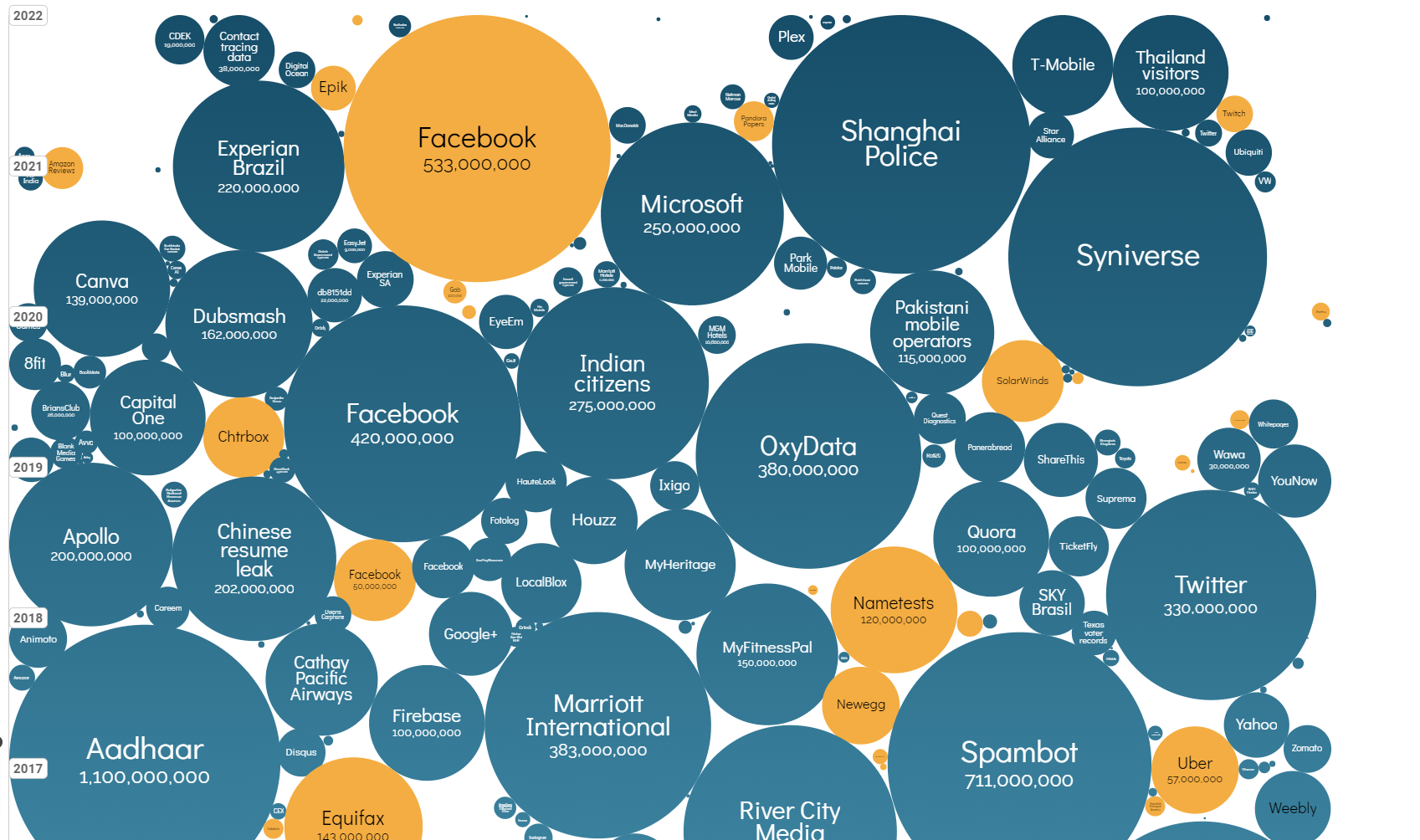
Data breaches keep getting bigger
Every one of these bubbles is a breach that spilled personal records, and the largest run into the hundreds of millions {{ cite.iib_breaches }}. The biggest entry on the chart, India’s Aadhaar at 1.1 billion records, is disputed: the authority that operates Aadhaar denies its database was breached, and attributes the reported access to misuse of a public search facility that exposes names and addresses but no biometrics {{ cite.aadhaar_dispute }}. Worth noting early that even headline numbers in security are often contested.
And the raw supply of bugs keeps growing
The number of publicly disclosed software vulnerabilities per year has trended sharply upward. Two different things drive that, and it pays to keep them apart. More bugs are genuinely being found, because automated discovery has become cheap: OSS-Fuzz alone has helped fix over 13,000 vulnerabilities across a thousand open-source projects {{ cite.ossfuzz }}. But the count also depends on who is allowed to issue an identifier, and there the change is larger still. The CVE Program had 24 organizations authorised to assign IDs in 2016. By 2024 it had more than 400, across 40 countries {{ cite.cve_cnas }}. More of what gets found now gets a number.
{{ cveSummary }}
These are living datasets. Open them and look for the most recent year:
Threat models: thinking critically about security
Whatever else you take from this course, two ideas are meant to outlast it: principles of critical thinking about security threats, and the concept of a threat model and how to apply it. The second is the tool that makes the first practical, so it is where we start.
A threat model is the single most important reasoning tool in this course. It forces you to state, precisely, what a defense protects against, and therefore what it does not. Any claim that something is “secure” is meaningless until you name the threat model it is secure against.
A threat model has four parts:
Worked example: Sign the back of a credit card?
Signing a credit card is a security mechanism. Let's use the four-part framework to figure out exactly what it protects against. Step through it:
{{ quizA.question }}
A defense is only as good as its threat model
Signing the card defeats a specific attacker: one standing at a physical terminal who cannot reproduce your handwriting. Change the threat model and the defense evaporates. Threat models are reasoning tools that let us systematically separate a real sense of security from a perceived one.
{{ quizB.question }}
Modern card-not-present payments, where the card is never shown and only the numbers are entered, check no physical signature at all. Write the four-part threat model for online card fraud, then reveal a model answer.
Setup: A customer's card number, expiry, and CVV exist and are entered on websites.
Assumption: No human ever inspects a signature, the merchant only checks that the numbers are valid.
Attacker capability: Can obtain card numbers in bulk (phishing, breaches, skimmers) but is not physically present.
Attacker goal: Make fraudulent purchases at scale. The handwritten-signature defense is simply irrelevant here, which is why the industry moved to CVV, 3-D Secure, and tokenisation.
“Nothing is ever secure”: a common misconception
It's tempting to shrug and say every system can eventually be broken, so why bother? That's the wrong frame. Security is a cat-and-mouse game, yes, but you win it by analyzing the attacker's cost versus the defender's cost at each step. A good defense doesn't make attacks impossible, it makes them uneconomical.
The decisive question is not “can it be broken?” but “does the attack scale cheaply?” An exploit that costs the attacker a lot per victim (physical access, custom hardware) is far less dangerous than one that costs almost nothing to repeat a million times (a wormable memory bug, a phishing kit). Keep this asymmetry in mind for the rest of the course.
Mapping threats by what they cost each side
One way to reason about a threat is to place it on two axes: what one more victim costs the attacker, and what coping with it costs the defender. Here is roughly where a few familiar things land, and what a defense does to them.
{{ t.note }}
Dots are threats. An arrow is what a defense does: it cannot delete a threat, it can only push it to the right, making each attempt cost the attacker more. Ask of any defense how far right it pushes, and what deploying it costs you.
The objective of this module
Now that you have the tool, here is what the rest of the module does with it. For each popular class of security threat, we work through three things in a fixed order:
- Take the threat and understand how it actually works. For Part I, that means memory errors and the exploits built on them.
- Analyze its threat model, precisely, using the four-part framework above.
- Learn the defenses, and argue about what each one does and does not buy you.
Note the emphasis. Attacks are studied because you cannot reason about a defense without knowing what it is defending against, but they are the means here, not the end. This is not CS2107 again, and it is not a CTF.
Syllabus & logistics
This book is Part I of the module: memory safety. Six lectures, from this introduction through to non-control-flow attacks, all of them about code that reads or writes memory it should not. Rust and elementary cryptography belong to Part II and are not covered here, though the Rust assignment is assessed against the ideas Part I sets up: once you have seen what goes wrong in C, a language that forbids it by construction is the obvious next question.
- CS2107, C programming, the basics of OS processes.
- Self-paced, and it expects self-learning.
- The module is heavy. It asks you to write secure code, and to argue about security rather than assert it.
- A memory-safety assignment: exploit real vulnerabilities. Individual.
- A Rust programming assignment, sitting in Part II. Individual.
- A midterm on Part I: in lecture, closed-book, no retakes.
- Ask on Canvas Discussions by default, so the answer is visible to everyone. It is a large class, and the same question asked privately gets answered once instead of once for all.
- Neither the TAs nor the instructor will debug your code for you.
- For anything specific to you, email via Canvas and CC {{ course.contact }}.
- There are no physical tutorials. Weekly Q&A sessions with the TAs run online, times are on Canvas.
- Do not use AI tools in any Part I assignment or exam.
- Every graded component in Part I is done individually.
- If you sought help elsewhere, acknowledge it: cite the source or the person.
- Academic dishonesty results in an F for the module.
Weights, dates, deadlines and Q&A times change each semester, so Canvas is authoritative for all of them.
What makes this module different
This is not a course about a single artefact like an OS or a database. It teaches the attacker's perspective (essentially, how not to build things) so that you can build them soundly. It's as much about a way of arguing as it is about new facts: making sound security arguments (threat models), and learning principles and abstractions for secure construction. The spirit is DIY and open-ended.
“Lectures are conceptual, assignments and quizzes expect you to understand things in depth.”
“I spent 14 hours learning a new language… reading external references… all with little help.”
There is a real gap between theory and systems in security, and closing it is the point. Lectures give the main message. The exercises fill in the details with examples, and exams test both. Nothing in the coding assignments works out of the box: be resourceful, tinker, and resist the urge to reach for AI. If you want push-button hacking, this is not that course.
References
The NVD dataset {{ cite.nvd_stats }} changes continuously, and the chart above is a snapshot, and its caption gives the year it was taken.